

Basic Measurements
Angle Measurement
Section titled “Angle Measurement”The device displays real-time X/Y angle information at the top of the screen.
| Axis | Direction | Range |
|---|---|---|
| X | Forward/Backward tilt | -90.0° to +90.0° |
| Y | Left/Right tilt | -90.0° to +90.0° |
Single Distance Measurement
Section titled “Single Distance Measurement”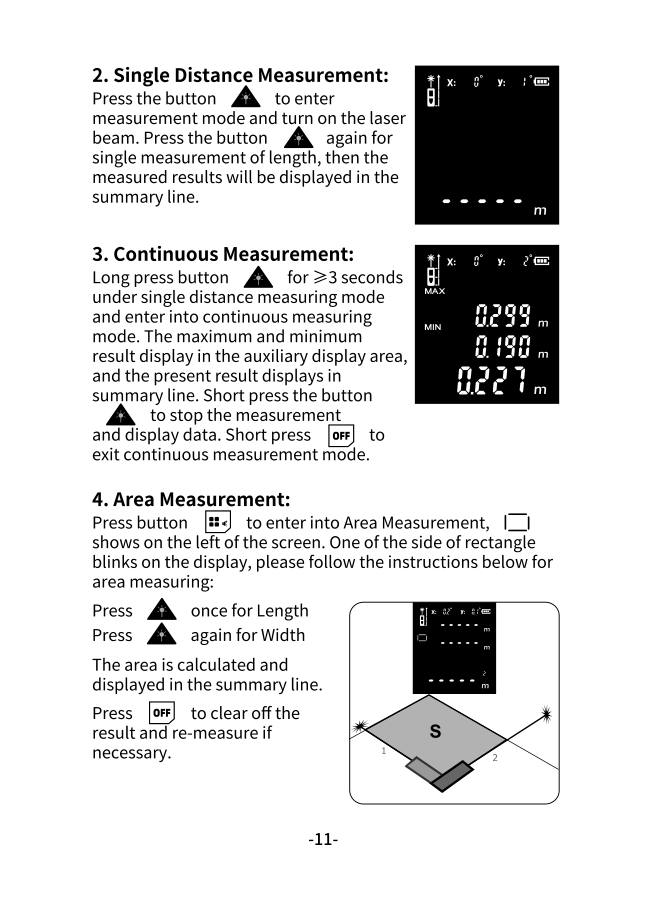
-
Activate the laser
Press A to turn on the device and activate the laser beam.
-
Aim at target
Point the laser dot at your target surface.
-
Take measurement
Press A again to measure. The result appears in the summary line.
Tips for Accurate Measurements
Section titled “Tips for Accurate Measurements”- Hold the device steady against a wall or surface
- Ensure the laser dot is clearly visible on the target
- Avoid measuring through glass or water
- For long distances, use a tripod
Continuous Measurement
Section titled “Continuous Measurement”Continuous mode is useful for finding minimum/maximum distances or tracking as you move.
-
Enter continuous mode
From single measurement mode, long press A for >3 seconds.
-
Monitor readings
- MAX and MIN values appear in the auxiliary display
- Current distance shows in the summary line
- Values update in real-time as you move
-
Stop measurement
Short press A to stop and lock the current reading.
-
Exit mode
Short press OFF to exit continuous mode.
Measurement Best Practices
Section titled “Measurement Best Practices”Optimal Conditions
Section titled “Optimal Conditions”| Factor | Ideal | Avoid |
|---|---|---|
| Surface | Smooth, light-colored | Glass, water, very dark |
| Lighting | Indoor, low ambient | Direct sunlight |
| Angle | Perpendicular to target | Extreme angles |
| Distance | Within rated range | Beyond model max |
Reference Point Selection
Section titled “Reference Point Selection”Choose your reference point based on the measurement situation:
| Reference | Best For |
|---|---|
| End (default) | Measuring from corners, inside walls |
| Middle (tripod) | Professional surveying, tripod use |
| Front | Measuring from edges, outside corners |
Long press + to change the reference point.