

Error Codes
When the device encounters a problem, it displays an error code. Use this reference to diagnose and resolve issues.
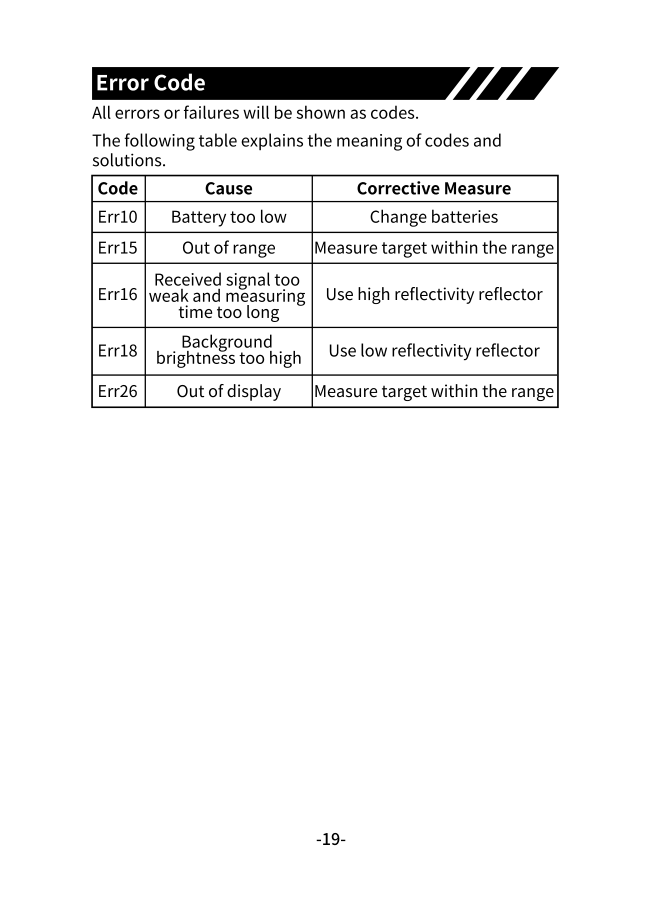
Error Code Reference
Section titled “Error Code Reference”| Code | Cause | Solution |
|---|---|---|
| Err10 | Battery too low | Replace or recharge batteries |
| Err15 | Target out of range | Move closer to target or use within rated range |
| Err16 | Signal too weak / measurement timeout | Use a more reflective target surface or reflector |
| Err18 | Signal too strong (saturated) | Use a less reflective target or add distance |
| Err26 | Calculation out of display range | Measure target within valid range |
Detailed Troubleshooting
Section titled “Detailed Troubleshooting”Err10 — Battery Low
Section titled “Err10 — Battery Low”Solutions:
- Connect USB charger (5V/1A) and wait for full charge
- Replace with fresh NI-MH rechargeable batteries
- Do not use alkaline batteries if charging via USB
Err15 — Out of Range
Section titled “Err15 — Out of Range”The target is beyond the device’s maximum measuring distance.
Solutions:
- Move closer to the target
- Check your model’s maximum range:
- S60: 60m / S80: 80m / S100: 100m / S120: 120m
- For long distances, use a laser target plate
Err16 — Weak Signal
Section titled “Err16 — Weak Signal”The laser beam isn’t returning enough light to the sensor.
Common causes:
- Target surface is too dark or absorptive
- Target surface is too far away
- Strong ambient light (sunlight) overwhelming the sensor
- Measuring angle too steep
Solutions:
- Use a white or light-colored target
- Use a laser reflector/target plate
- Shade the target area from direct sunlight
- Move closer to the target
- Measure perpendicular to the surface
Err18 — Signal Too Strong
Section titled “Err18 — Signal Too Strong”The reflected laser is saturating the sensor.
Common causes:
- Very reflective surface (mirror, polished metal)
- Target too close
- Retroreflective material
Solutions:
- Cover reflective surfaces with paper or cloth
- Increase distance from target
- Angle the device slightly off-perpendicular
Err26 — Display Overflow
Section titled “Err26 — Display Overflow”The calculated result exceeds display capacity.
Common causes:
- Pythagoras calculation with invalid inputs
- Legs longer than hypotenuse in indirect measurement
Solutions:
- Verify your measurement geometry
- Ensure right angles are truly 90°
- Re-measure within valid parameters
General Troubleshooting
Section titled “General Troubleshooting”Device Won’t Turn On
Section titled “Device Won’t Turn On”- Check battery installation (correct polarity)
- Charge batteries via USB
- Try fresh batteries
Inaccurate Readings
Section titled “Inaccurate Readings”- Clean the laser lens
- Verify reference point setting
- Check for interfering reflections
- Use a tripod for stability
Bluetooth Won’t Connect (BT models)
Section titled “Bluetooth Won’t Connect (BT models)”- Ensure device is powered on
- Enable phone Bluetooth
- Restart the Huepar app
- Unpair and re-pair the device